This section, while not all-inclusive, enumerates some of the more common problems with ATCF and provides some insights on what may cause them and strategies that have been successful at resolving them in the past.
One of the most common problems with ATCF is missing fields and/or observation data; in particular, missing gridded field data and/or wind data. These data are normally generated at the large numerical weather prediction centers (e.g., FNMOC and the National Centers for Environmental Prediction or NCEP) and, at most installations, downloaded automatically without user intervention. The most likely causes of missing fields or observation data are:
Fields not produced at the source. This could happen because of a disruption in the ops run at the source or as the result of an update cycle that introduces a problem with the fields in question.
Data improperly encoded. Occasionally there are problems with the GRIB and BUFR encoders that can cause errors when the fasDB decoders attempt to decode and store the data.
Disruption in the data feed from FNMOC or NCEP (CAGIPS problems, servers down, network problems, etc).
A less likely cause could be corruption of the acceptList.txt file in the local fasDB database. This file provides the list of fields that fasDB will accept at your location.
The system administrator’s first actions when it has been determined that ATCF is missing fields/observations data should be to:
Determine specifically which data (data types and/or specific fields/observations) are missing.
Check the fasDB logs. These should indicate whether the data were received but could not be decoded or not received at all. The field retrieve status is shown in the *.out files in $ATCF/local_model_data. Examples files are getbams_frost.out, getwbar_frost.out, and <stormid>_<aidid>_getanystips.out.
If data were not received, or received corrupted or incorrectly coded, contact the distributor, describe the problem, and request the data be rerun or retransmitted.
For fields that show up in the "Display GRIB Data" fields listing but aren't visible on the map display, the problem could be related to the color file for that particular product, bad colors selections, or improper thresholds; see Section 3.1.3.3.
For missing Raw Data, the problem could be empty files - see the $ATCFTMP directory for the files being displayed. Other possible problems could be too narrow or improper time thresholds in the "Display Raw Data" dialog.
Contact NRL programmers to report the problem and its resolution, or to troubleshoot if the problem has not been resolved.
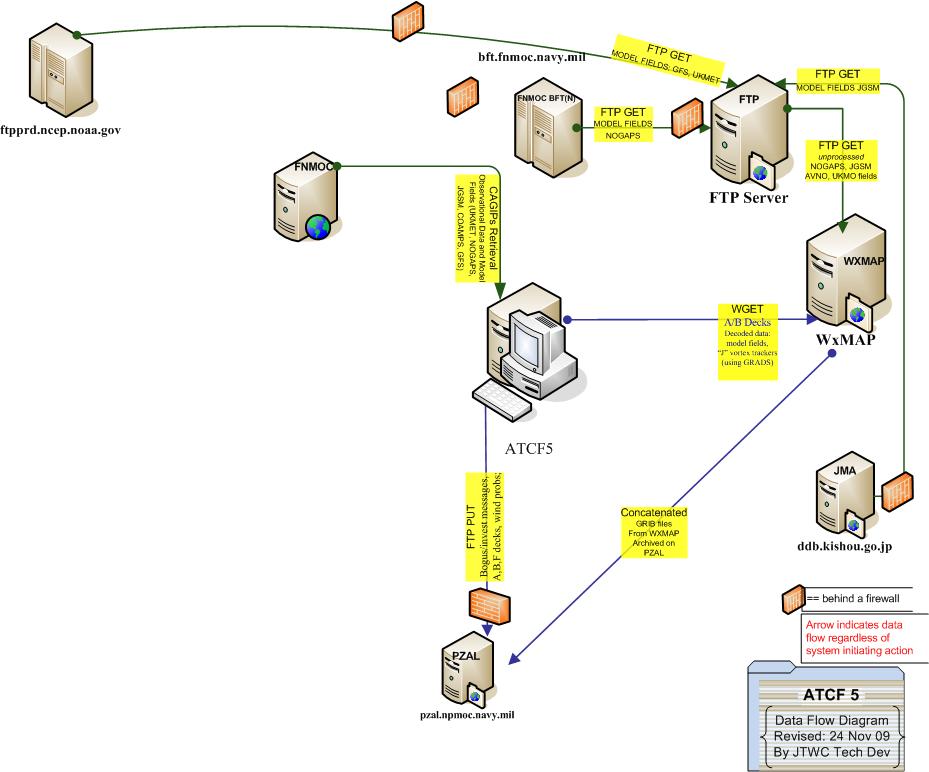
Figure 1 below shows, for reference, the data flow for model fields at JTWC as of September 2009.
Figure 1. Data Flow for Model Fields at JTWC
Aids are produced by a number of sources, including FNMOC, NCEP, NHC, NRL Monterey, and the Japan Meteorological Agency (JMA). Figure 2 below shows the data flow for aids (also called trackers) at JTWC in September 2009.

Figure 2. Data Flow for Aids (Trackers) at JTWC
The common causes of missing aids data are:
Data not produced by the source.
Data lost or garbled in transmission.
Mishandling of the aids data by transfer scripts at the ATCF installation.
System administrator actions to correct problems with aids data include:
Check receipt logs to determine whether the aids in question were in fact received by the local installation. If not, contact the source to help determine whether the aids were created properly. If the source has a good copy, they can retransmit.
If the logs show the aids were received, check the ingest logs to see whether errors were encountered in processing at the local site and whether the data were successfully stored. If not, attempt to troubleshoot locally or request help from NRL Monterey.
A convenient way to check aids generated by ATCF is provided within ATCF – from the Aids menu, select Create Obj Aid Forecasts…, and from the flyout menu select List Latest Obj Aid Forecasts. This will bring up the output text from the latest objective aids model run.
Check the A-Deck for possible corruption using the “Check Objective Aids” function or visual inspection. If errors found, make a backup of the file and attempt to fix it. Be sure to copy the corrected file to the $ATCFARCHIVES/yyyy directory.
Report problem and its resolution NRL Monterey. If not resolved, report problem to NRL Monterey.
Like aids, fixes are produced by a variety of sources, including NHC, NCEP, JMA, and CIRA. Figure 3 below shows the nominal data flow for fixes at JTWC.

Figure 3. Fix Data Flow at JTWC
The common causes of missing fix data are:
Data not produced by the source.
Data lost or garbled in transmission.
Mishandling of the fix data by scripts at your site.
System administrator actions to correct problems with fix data include:
Check receipt logs to determine whether the fixes in question were in fact received by the local installation. If not, contact the source to help determine whether the fixes were created properly. If the source has a good copy, they can retransmit.
If the logs show the fixes were received, check the ingest logs to see whether errors were encountered in processing at the local site and whether the data were successfully stored. If not, attempt to troubleshoot locally or request help from NRL Monterey.
Check the f-Deck for possible corruption. Do so by using the “Check Fixes” function on the ATCF and by visual inspection.
Check the "Limit fix display" checkbox in the Preferences or "Display Fixes" dialogs, if it's on then check the time threshold.
Report problem and resolution to NRL Monterey. If problem unresolved, report problem to NRL Monterey.
ATCF users have occasionally reported that not all of the selected fixes are showing up in the statistics output. The problem stems from the fact that fixes must be of type “position” to be included in the position statistics. To fix this, ensure that the fix center/intensity flag is set properly. This is a parameter in the fix file that defines what type of fix the record is (“C” indicates center, “I” indicates intensity, and “CI” indicates both). The upshot is that this flag must be set to “C” for a fix to show up on the map and be included in the fix position statistics. The fix must contain “I” for the fix to show up on intensity vs time graphs or in intensity statistics. Multiple types (e.g., “CI” can be specified in the file. Be sure that the type is limited to those the fix is meant to describe. For example, a fix meant only for intensity should not have “CI” set in the center/intensity parameter of the fix file.
Problems encountered with satellite imagery include non-receipt and problems with the imagery itself. For non-receipt, it is probably best to contact FNMOC and/or NRL Monterey to trouble-shoot the problem. There is a script ($ATCFSCRIPTS/get_imagery) that can be run manually. The set of arguments to run get_imagery are displayed when it is executed. If this script is run manually, some errors may appear on the command line that indicate the issues.
Problems with the imagery itself have typically been associated with incorrect or inconsistent (between multiple sources) JIF header information in the files. These files can be inspected for differences using the Linux utility "od -c <filename>" and noting that the header information is near the end of the file.
There have been occasional problems reported with ATCF’s internal database (e.g. corrupted data, storm files missing data). The most common causes of this are:
Local editing of ATCF files. Check first for recent changes in ATCF files and data processing files such as crons. Such changes often have unforeseen consequences and are the most common cause of ATCF database problems.
Bad or corrupted files received from other sites. We suggest running the deck checkers provided in ATCF: Aids → Check Objective Aid Data for aids (a-deck), Fixes → Check Fix Data for fixes (f-deck), and Track → Check Best Track Data for best tracks (b-deck). Executing these checks also has the salutary effect of converting files that were received in DOS format to the UNIX format that ATCF needs.
If the checks above don’t work, the problem may relate to a change in the ATCF code itself. Contact NRL’s ATCF programmers to help resolve the issue.
NRL Monterey occasionally fields questions about adding new data types and/or whether a new data type can be used in ATCF. The answer is that, while it’s possible that a new data type might work properly with no new work required, as a rule most new data types would need to be checked out and modifications would need to be made to the ATCF and/or fasDB code to accommodate them. Requests for new data types should be referred to NRL Monterey for evaluation, implementation, and testing before the new data are made available for ingest.
Software problems can sometimes occur as a result of changes introducing unforeseen behaviors. These may include instances where the user interface doesn’t produce the desired results. Such problems should be referred to the programmers at NRL Monterey for resolution. The problem is often a mismatch of an executable and its resource files or configuration files. Another issue could be O/S updates (e.g., Motif) that are not compatible with ATCF software.
ATCF outputs products to various sites (particularly FNMOC and NRL Monterey, for dissemination via the TC web pages). Most of the problems with product dissemination arise from network issues. The first resources for dealing with such problems should be the local network administrator and, for Navy sites, the NMCI system administrator. Figure 4 below shows the distribution path for products at JTWC.

Figure 4. ATCF Product Push Data Flow at JTWC